Other products
Menu
 +971 54 547 0189
The customer support service is open from 9:00 to 20:00, seven days a week.
- Mobile+971 54 547 0189
- Mobile+971 54 547 0189
We'll call you back
Leave your number and we will call you back within 5 minutes, press - Call me back
id: 38495
In stock


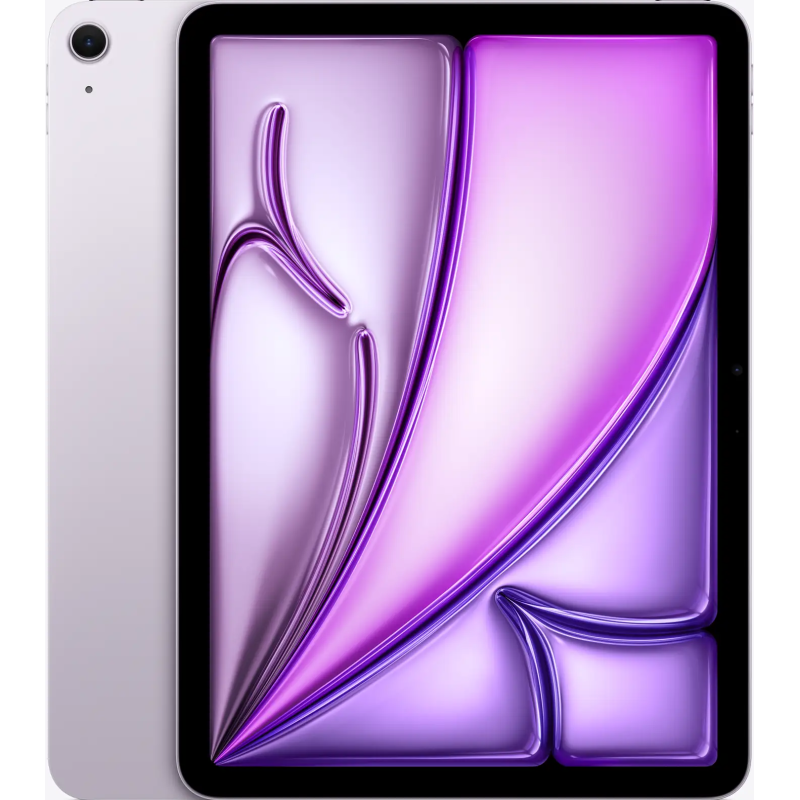
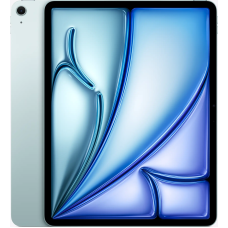
Apple iPad Air 11 (2025) 8/1TB Wi-Fi Purple

id: 38495
Memory
RAM
Mobile Internet
Color
Brand:
AppleScreen size
11Screen resolution
1640 x 2360Screen matrix type
Liquid Retina IPS LCDProcessor
M3Memory
1024 GB (1 TB)Main Camera Resolution
12 MPWeight
460 gPickup
YesShipping
YesWarranty
12 monthsDescription
Attributes
Reviews (0)
Shipping and payment
Guarantee
Installment
Description
Apple iPad Air 11 (2025) 8/1TB Wi-Fi Purple buy in UAE, Dubai, Abu Dhabi
Apple surprises again: the iPad Air 11 is a tablet that can easily replace a laptop. It combines power, style, and convenience while remaining affordable. With the new M3 chip and updated features, this iPad is ready to handle any task — from work to entertainment.
Design: recognizable style with new accents
The 2025 model is immediately recognizable as an Apple device — it embodies the signature minimalism that fans have long grown accustomed to. The body is made of recycled aluminum, which is not only environmentally friendly but also feels light, sturdy, and pleasantly cool to the touch. The tablet is compact — 247.6 mm x 178.5 mm, very thin — only 6.1 mm, and weighs about 460 grams. It is truly comfortable to hold with one hand.
/blue/1.jpg)
Visually, the tablet hasn’t undergone any radical changes, but that’s the point: Apple sticks to its recognizable style where everything is in its place. Straight edges, rounded corners, clean lines — nothing extra, yet it looks expensive and stylish. The screen seems slightly larger due to the thin bezels, which don’t distract from the content, and the body feels neat and balanced.
This year’s color palette is delightful. The iPad Air is now available in four shades: "Starlight" (almost silver with a warm tone), blue, purple, and gray. The colors look fresh but not flashy — even the bright purple is subtle and adds a touch of individuality.
The Touch ID fingerprint scanner is integrated into the power button on the top edge. It’s convenient: turn on the tablet, and it unlocks immediately. It works quickly, accurately, and reliably.
/blue/2.jpg)
The body still has a USB-C port — a universal connector suitable for charging, connecting an external display, and transferring files. It also supports the 2nd-generation Apple Pencil, which magnetically attaches to the side and charges there. With the Magic Keyboard, this thin tablet can almost turn into a laptop — useful for frequent work with texts or documents.
Display: brightness and clarity in every pixel
The display is arguably one of the most important parts of any tablet. It’s what we look at when reading, browsing social media, working, drawing, watching movies, or video calling. In this regard, the iPad Air 11 (2025) does not disappoint — its screen is excellent.
It features an 11-inch Liquid Retina display with a resolution of 2360×1640 pixels and a pixel density of 264 ppi. This means images look sharp, text is smooth, and photos and videos are rich and realistic. No jagged icons or pixelated text — everything looks clean and pleasant.
The maximum brightness is 500 nits. It’s not record-breaking by modern standards but more than sufficient for most situations. The tablet can be comfortably used indoors or outside on a sunny day.
/blue/3.jpg)
The display also supports the wide DCI-P3 color gamut, which is especially important for designers, photographers, and anyone working with color. The image is vivid but not oversaturated. Colors remain natural, noticeable even in the iPadOS interface — everything looks fresh, neat, and harmonious. Movies and photos come alive on this screen, especially if you’re used to simpler panels.
The refresh rate, as in previous generations, is the standard 60 Hz. Yes, it’s not the “magical” 120 Hz of the iPad Pro models, and if you’ve used ProMotion before, the difference is noticeable. But for most tasks, this is more than enough.
The screen coating deserves a mention. It’s not just “glass” — it has an oleophobic layer, so fingerprints hardly stick and can be wiped away easily. There’s also an anti-reflective coating — not full like Pro models, but noticeable. It helps when using the tablet in bright light or near windows: the screen reflects less and remains readable.
Technical specifications: power in a compact body
Under the hood, there’s more than you’d expect from such a thin and light device. While the tablet’s exterior hasn’t changed much, the inside is a real upgrade. The star here is the new Apple M3 chip. It’s a powerful processor borrowed from laptops, instantly raising the iPad Air’s performance. It has 8 CPU cores and 9 GPU cores. In simple terms, the tablet is noticeably faster, more responsive, and more capable of handling any task.
/blue/4.jpg)
RAM is now 8 GB, which is excellent news. Previously, iPad Air had 4 or 6 GB — sufficient for basic needs — but 8 GB gives more freedom. You can keep multiple browser tabs open without them reloading, use complex editors, and apps still launch quickly and run smoothly.
Internal storage options have also increased: 128, 256, 512 GB, and even 1 TB are available.
The tablet supports modern connectivity standards: Wi-Fi 6E and Bluetooth 5.3, providing stable connections, fast data transfer, and minimal lag. This is particularly noticeable when using wireless headphones, keyboard, mouse, or large cloud files. Cellular models also support 5G, keeping you online on the go without relying on Wi-Fi.
The USB-C port in the iPad Air is now even more versatile. It supports high-speed data transfer, fast charging, and even connecting external displays up to 6K. Yes, you read that right — a tablet that can be connected to a high-resolution monitor and function like a full computer. Perfect for video editing, graphics work, or multitasking.
And the battery? It’s solid — 28.93 watt-hours. Apple claims up to 10 hours of web browsing or video playback, and in practice, this is realistic. With moderate use — reading, note-taking, messaging, and listening to music — you can comfortably get a full day without charging.
Camera: sharp photos and 4K video
When you first hold the iPad Air 11, you might think: the cameras aren’t the main feature. But then you realize you want to use them more than expected. Both rear and front cameras are not just for show — they’re practical, high-quality, and enjoyable in daily use.
/blue/5.jpg)
The rear camera is 12 MP with an f/1.8 aperture. It may not replace a DSLR, but capturing a document or a sunset is easy. Images are sharp with good colors and no complicated settings. For video, the iPad can record 4K at up to 60 fps, delivering smooth, detailed footage like a high-end smartphone. Slow-motion mode is also supported.
The real star is the front camera. Apple finally placed it where it should be — on the long side of the screen. This means that when holding the tablet horizontally (as is common), the camera faces you directly rather than from the side. It’s much nicer for Zoom or FaceTime calls when the other person looks you “in the eyes.”
The front camera is also 12 MP with a wide 122° field of view, giving plenty of room in the frame. You can move closer or farther away and still stay in focus. Center Stage helps keep you centered, smoothly tracking your movement without abrupt jumps.
LLC MCC "Rescue Money"
Each of us, at least once in our lives, has faced financial problems. From such situations, unfortunately, no one is immune. What to do if problems suddenly overtook, and there is no one to ask for help? Run to the bank and apply for a loan? But such procedures, as a rule, take a lot of time and you will not receive the necessary amount soon. But money is needed right now! In the city of Sevastopol, LLC MCC Help Out Money comes to the rescue.
"Help Money" is a quick loan, from 3.5% per month with an initial payment of 0% to 50%!
Favorable terms of cooperation
By choosing the "Rescue Money" MCC, you get the desired amount without long waits, without fear of a bank refusal, no fines, and payment can be made at the cash desk closest to your home.
The advantages of such a loan:
- * 25% net overpayment per year;
- * Issuance of a loan in the amount of 2 to 100 thousand;
- * Loan term from 2 to 10 months;
- * Possibility to close the contract ahead of schedule;
What will be required to obtain the desired amount:
Passport (with a permanent residence permit). Data on the place of work (name of the institution - individual entrepreneur, LLC, contact phone number of the management or colleagues at work). The work may be informal. Only 20 minutes for registration and 20 minutes for making a decision! After 40 minutes, you will be able to receive your money.
MCC "Rescue Money" - will solve any of your financial problems, quickly, profitably and reliably. The most transparent terms of cooperation, a flexible system for calculating the interest rate, savings on payments, the minimum package of documents for obtaining a loan and no hidden fees! In Sevastopol, there are many offices for obtaining a loan.
For more information, please contact our contact number.
General characteristics
Structure and appearance
Software
Screen
Memory and processor
Main camera
Photo and video shooting
Front camera
Multimedia
Connection
Interfaces
Wireless communications
Network
Other functions
Power
Complete set
Additional information
Purchase methods
Connection
Product type
tablet
Announcement date
4 March 2025
Released
14 May 2025
Announcement year
2025
Brand
Apple
Dimensions
247,6 x 178,5 x 6,1 mm
Weight
460 g
Body material
glass, aluminum
Moisture protection
none
Waterproofness category
none
Color
Purple
Operating system
iPadOS
Operating system version at the start of sales
iPadOS 17
Proprietary shell
iPadOS
Touch screen
capacitive, multi-touch
Screen matrix type
Liquid Retina IPS LCD
FPS
60 Hz
Screen size
11
Screen resolution
1640 x 2360
Aspect ratio
4:3
PPI
264
Scratch Proof glass
none
Processor
M3
Number of GPU cores
8
CPU frequency
3.5 Ghz
Video processor
Apple GPU 9-core
Memory
1024 GB (1 TB)
RAM
8 GB
Memory card slot
none
Main Camera Resolution
12 MP
Number of main cameras
1
4K FPS
24, 25, 30, 60 fps
Full HD FPS
24, 25, 30, 60 fps
HD FPS
30 fps
Photo functions
Autofocus with Focus Pixels, Smart HDR 4, Wide color gamut for photos and Live Photos, Photo geotagging, Automatic image stabilization, Burst mode, Supported image formats: HEIF and JPEG
Flashbulb
none
Functions of the main cameras
Wide-angle, Dual Pixel Phase Detection Autofocus (PDAF)
Front-camera
12 MP
Number of front cameras
1
Front camera camera
12 MP
Front camera diaphragm
f/2.0
Front Camera Photo Options
Time-lapse with stabilization, Extended Dynamic Range (EDR) up to 30 fps, Cinematic stabilization (1080p and 720p)
3.5 mm jack existence connecter
none
FM radio
none
Built-in microphone
available
Number of mics
2
Built-in speakers
landscape stereo speakers
Number of speakers
2
Video playback formats
HEVC, H.264, AV1 и ProRes HDR с Dolby Vision, HDR10+/HDR10 и HLG
Audio playback formats
AAC, MP3, Apple Lossless, FLAC, Dolby Digital, Dolby Digital Plus и Dolby Atmos
SIM card support
none
Number of SIM cards
none
SIM card type
Without SIM card
Mobile Internet
none
Audio/headphone jack
USB Type-C 3.1 Gen2
Wi-Fi
available
WLAN
Wi-Fi 802.11 a/b/g/n/ac/6e
Bluetooth
available
Bluetooth version
5.3
Bluetooth profiles
5.3, A2DP, LE
IRDA
none
NFC
none
Presence of NAT
optional
Sensors
Touch ID, Three-axis gyroscope, Accelerometer, Barometer, Ambient light sensor
Connecting external devices via USB
optional
Battery capacity
28.93 Wh
Charger connector type
USB Type-C 3
Battery type
Li-Po
Fast charge option
none
Charging power
20 W
Wireless charging function
none
Wireless charging power
none
Additional charging function
none
MagSafe support
none
USB charging
available
Complete set
Tablet, 1 m USB-C charging cable, 20 W USB-C power adapter
Official warranty
12 months
Warranty
12 months
***
All features, specifications and equipment of the device are only a demonstration of the capabilities, and may change without prior notice to the manufacturer or seller. Please check the information before purcha
Complete set
Display: Fully laminated, anti-reflective coating, 500 nits brightness, supports Apple Pencil Pro, supports Apple Pencil (USB-C), Apple Pencil cursor.
Media engine: Hardware acceleration for 8K HEVC, 4K H.264, ProRes, and ProRes RAW; video decoding engine; video encoding engine; ProRes encode and decode engine; AV1 decoding.
Supports one external display with up to 6K resolution at 60 Hz, built-in DisplayPort output via USB-C, output via VGA, HDMI, and DVI supported with adapters (sold separately), AirPlay up to 4K for mirroring, photo, and video output to Apple TV (2nd generation or later) or AirPlay-compatible smart TV.
Supports video mirroring and output via USB-C Digital AV Multiport and USB-C VGA Multiport adapters (adapters sold separately).
Buy profitably
Trade in
Purchase type
in installments, on credit
Connecting to a computer via USB
available
Connecting to a TV/Monitor
available
Dock connector
available
Reviews (0)
Shipping and payment
Delivery and payment
Delivery methods:
Payment methods:
All prices on the site are indicated at a discount for cash payment. When paying cash-free or with a card - the discount does not apply.
Guarantee
Warranty
Our store provides warranty across Russia and UAE for all electronic products by Apple, Samsung, Xiaomi, Huawei/Honor, OnePlus, Nokia, Google, Oppo, Realme, Vivo – 12 months. 3 months warranty for all accessories.
Exchange and return
The return and exchange of goods are carried out at any pickup point regardless of the place of purchase, in the network of our stores or by courier. If you decide to return or exchange the product on the day of purchase, you should visit the store where you purchased the product.
Return of goods of appropriate quality
Return of goods of appropriate quality is possible when their trade dress, consumer properties, as well as a document evidencing the fact and conditions of the purchase of goods are preserved. If the buyer does not have this document, they can refer to other evidence of the purchase of the goods from this seller. A list of goods subject to return is regulated by the Law Concerning the Protection of Consumers' Rights, article 25.
Return of goods of inappropriate quality
The buyer who was sold a product of inappropriate quality, if it was not stipulated by the seller, has a right to demand:
- free defect correction;
- equitable reduction in the purchase price;
- replacement for a product of a similar brand (model, article) or for the same product of another brand (model, article) with a corresponding recalculation of the purchase price.
At the same time, in relation to sophisticated and expensive goods, these claims of the buyer are subject to satisfaction in case of the detection of major defects.
The buyer, instead of claiming as indicated above, has the right to refuse the contract and demand the return of the amount paid for the goods. The buyer shall return the goods with defects at the request of the seller and at his expense.
If the seller refuses to transfer the goods, the buyer has the right to refuse the contract and demand compensation for the damages caused. After claiming for the return of the amount of money paid for the goods, the cost of the goods shall be returned to the client within 10 days from the date the seller receives the written application from the client and return of the goods.
When returning goods of inappropriate quality, the buyer has the right to refer to other evidence of the goods purchased from the seller if the former does not have a document confirming the fact and conditions of the purchase of goods.
If the client refuses the goods, the gift given with this product is subject to mandatory return with the preservation of the trade dress.
If during the quality check (examination) it is established that the defects of the goods arose due to circumstances for which the seller/manufacturer is not responsible (for example, the screen is broken as a result of a fall, the device does not turn on because water got on it, etc.), you shall reimburse the costs of quality control (examination), storage and transportation of goods.
Installment
| Due date | First installment | Sum | Monthly payment | Overpayment |
|---|---|---|---|---|
| 2 months | 10% of amount (355 AED) | 3 555 AED | 1 600 AED | 12% of the product amount (381 AED) |
| 3 months | 10% of amount (355 AED) | 3 555 AED | 1 066 AED | 12% of the product amount (381 AED) |
| 4 months | 10% of amount (355 AED) | 3 555 AED | 800 AED | 12% of the product amount (381 AED) |
| 5 months | 10% of amount (355 AED) | 3 555 AED | 640 AED | 12% of the product amount (381 AED) |
| 6 months | 10% of amount (355 AED) | 3 555 AED | 533 AED | 12% of the product amount (381 AED) |
 0
0