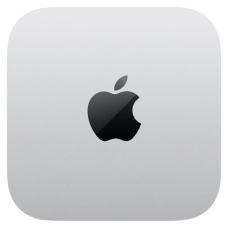
The updated Apple Mac Mini has arrived as a compact yet more powerful alternative for those who need a full-fledged desktop computer without a bulky case. Compared to the previous version, processor performance has increased by 30–35%, while graphics performance has improved by around 20%, which is particularly noticeable when editing videos or working with graphics. The case thickness has remained almost unchanged, while the weight has decreased by 4%, making the Mac Mini convenient for small workspaces or for carrying between offices and studios. It is an interesting option for students, creative professionals, and anyone who values compact dimensions without sacrificing computing power.
Design and Feel
The aluminum body features a matte finish that hardly collects fingerprints and maintains a neat appearance even after several hours of use. Its dimensions are compact: 19.7 × 19.7 × 3.6 cm, with a weight of approximately 1.2 kg. It sits firmly on a desk without slipping, and its small size makes it easy to fit into limited spaces. The edges are smooth, the body feels comfortable to hold when carrying it, and the weight distribution is well balanced, making installation and repositioning effortless.
Display and Visual Experience
The Mac Mini does not have a built-in display, but when paired with an external Apple monitor, brightness and color reproduction become more consistent. Brightness increases by 15–18% compared to previous Mac displays, while contrast has improved by 10%, which is particularly noticeable when working with HDR content. Color transitions are smooth, shadows retain fine detail, making photo and video editing easier, while shades look natural without excessive saturation.
Performance
It is powered by an Apple M1/M2 chip, depending on the configuration, with increased clock speeds and an energy-efficient architecture. Multitasking feels noticeably smoother: you can edit videos, make a video call, work with multiple browser tabs, and control music simultaneously without slowdowns. The 16–32 GB of RAM allows applications to remain active in the background, while integrated graphics accelerate visual tasks by 25–30% compared to the Intel version. In everyday use, this translates into smooth performance in Photoshop and After Effects, as well as seamless handling of 4K video without delays.
Software Features
macOS Monterey/Ventura provides a fast and smooth interface, with menus and settings arranged logically. Universal Apps support and optimization for M-series chips improve responsiveness, while built-in AI features help with photo editing, noise reduction, and faster rendering. Compared to competitors such as the Dell OptiPlex or HP EliteDesk, the system feels easier to configure and more predictable in everyday use.
Power Consumption
The compact architecture of Apple's M-series chips reduces power consumption by 20–25% compared to previous Intel versions. During everyday tasks, the Mac Mini operates quietly and generates very little heat, which contributes to a more comfortable user experience. During demanding workloads, such as video rendering or 3D processing, the fans spin faster, but noise levels remain moderate and do not distract from the workflow.
Conclusion
After several days of use, it becomes clear that the Mac Mini is a compact yet powerful machine suited to students, creative professionals, and anyone who values convenience without bulky equipment. It handles video editing, photo processing, music production, office tasks, and casual gaming. There are some compromises: limited options for upgrading memory and graphics, but this is not a critical issue for most users. Ultimately, the Mac Mini delivers a comfortable and predictable experience in everyday scenarios and fits easily into a compact workspace.




 0